


UKG Pro
4.26.70K Reviews
App Specs
- Version
- 5.07.02.0767
- Updated On
- License
- Free
- Downloads
- 5,000,000+
- Developer
- UKG, Inc.
- Categories
- Business
- Platform
- Android, iOS
Screenshots
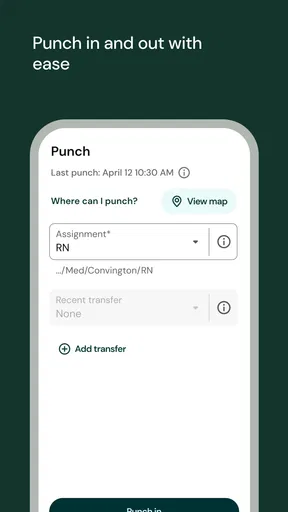
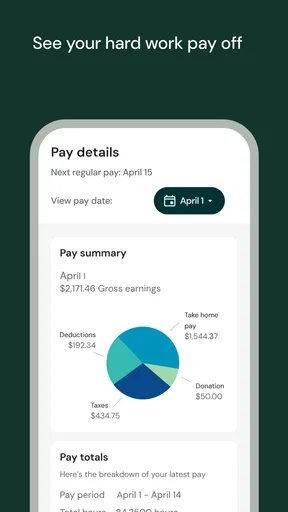
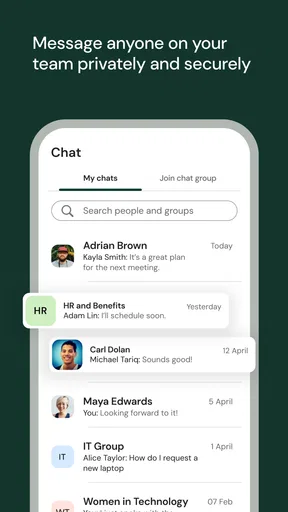
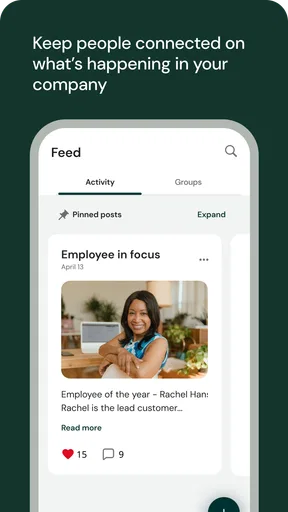
 Analysis by AppCompare
When I try a work app, I ask a simple question after the first few days: will I still open it when the novelty wears off? UKG Pro is most useful when it becomes a practical stop for recurring work details rather than another place to browse. It is a free business app from UKG, Inc., and its purpose is to put work-related tasks and information within reach on a phone. That can make a real difference when a shift, a pay statement, or a benefits question comes up away from a desk.
Why the first week can feel useful
The early appeal is convenience. Instead of waiting until I’m at a computer to check a work detail, I can use a mobile app for the parts of work life that are relevant to me. UKG Pro is designed as an employee-facing work experience, so the value is less about entertainment or exploration and more about having a place to handle routine questions. I would expect the first week to be most helpful when I already know what I need to check, such as a pay statement or a shift-related detail.
That distinction matters: a work app is only as useful as the information and tools available to an employee through their workplace. It is not a general job-search service or a universal payroll account. Before relying on it, I’d make sure my employer uses UKG Pro and that I have the right sign-in details. If someone is looking for an independent way to manage pay from several unrelated jobs, a dedicated budgeting or record-keeping app may fit better.
A realistic day-to-day rhythm
Imagine checking a work detail on the way out the door, then looking at a pay statement later when a household budget needs updating. That is the sort of small, repeatable use that can justify keeping UKG Pro installed. The app is not valuable because it replaces every conversation with HR; it helps make common information easier to reach when a question occurs to me. I’d still use the appropriate workplace contact for a discrepancy or a policy decision rather than assuming a mobile screen can resolve every issue.
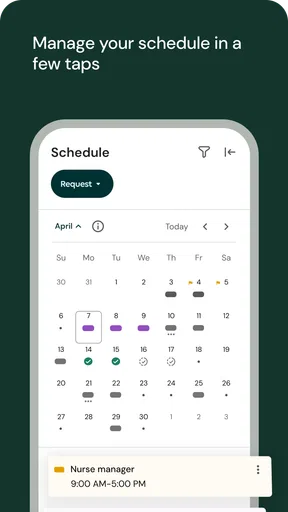
For employees whose work routines involve changing shifts or timekeeping, the phone format can be particularly handy. A quick check can reduce the need to remember details until later, and notifications may help bring relevant updates to attention. My practical tip would be to treat notifications as prompts, not as a complete record: if a change affects when I need to be somewhere, I’d open the app and verify the current information instead of relying on a notification preview.
Where it fits among work apps
UKG Pro occupies a different role from a calendar, a messaging app, or a personal finance tracker. Those tools can help organize appointments, conversations, or spending, but they do not serve as the same employer-linked point of access. The trade-off is that a specialized employee app can put work information together while still depending on the employer’s setup. If I only need to remember a shift, a normal calendar may be simpler; if I need an employment-related detail, the work app is the more relevant place to look.
That also means I wouldn’t install it expecting every feature to be equally useful to every employee. Someone who rarely needs to check work information on a phone may get little benefit from a dedicated app. Someone who often needs to look up work details away from a computer has a stronger reason to keep it. The right comparison is not “which app has the most tools?” but “which tool handles the task I actually need without adding another chore?”
Worth Reading Before You Choose

EA SPORTS FC Mobile 26 Is a Bigger Football Game, but It Takes Time

Flipboard Shows What News Apps Must Do Beyond the Feed

Switching to Android Auto Means Rethinking Your Driving Routine

Google Calendar Makes a Crowded Week Easier to Manage

Ludo King Makes the Most of the Minutes Between Plans

Baby Panda World Brings Quick Play to Modern Phones, but Its Game Library Feels Busy
Keeping it useful after the novelty fades
I find an employee app earns a place on my phone when it helps me close a small loop in my routine, not when I browse it out of obligation. In the next section, I’d look at which recurring checks are worth keeping and how to avoid turning convenience into another source of notifications.
Month-to-month value and small habits
For lasting value, I’d connect the app to an existing routine instead of trying to remember to open it at random. Checking a relevant work detail when reviewing the coming week, or looking at a pay statement when planning expenses, gives it a clear job. That habit should be light: the app is useful when it saves a trip to another channel, not when it becomes a daily task simply for the sake of using it.
A less obvious benefit of a single work hub is that it can make personal record-keeping easier. When a pay statement is available, I can review it at the point when I’m already thinking about income, rather than leaving the task until I forget. I would still keep my own financial notes where I normally do; the work app is a place to consult employment information, not a substitute for a personal budget or a complete archive of someone’s financial life.
Maintenance, access, and sensible checks
There is some setup friction with any employer-linked tool. A user needs to be able to sign in, and access can depend on how their workplace has configured the service. I would get that working before I need the app in a hurry, then check that I can reach the information I expect. If something important is missing or looks wrong, the sensible next step is to contact the relevant workplace team rather than repeatedly reinstalling the app or assuming the phone is at fault.
The app is listed for Android devices running version 8.0 or later, and its current version is 5.01.04.0671. Keeping an app reasonably current is a sensible maintenance habit, especially for a tool tied to work access. Still, updating the app cannot fix an account or employer-configuration issue, so I’d separate those possibilities before troubleshooting. UKG Pro is rated for Everyone, but the information it may display is personal; I’d use a secure screen lock and be thoughtful about opening work details where other people can see the phone.
One practical trade-off is that a phone makes work information convenient while also placing it alongside personal apps and notifications. I’d decide which alerts are genuinely useful and avoid letting routine prompts take over the day. If I share a device, or often leave my phone unattended, I’d be more cautious about keeping sensitive screens open. Convenience is a real advantage here, but it works best when paired with ordinary care around account access and the device itself.
When it may become tiring
The main source of fatigue is not necessarily the app itself; it is the feeling of having to check one more channel. If an employee already gets work updates through several tools, another notification stream can add noise unless it replaces a step they already take. I’d keep only the habits that solve a real problem and avoid treating every alert as urgent. If the app does not save time or make a recurring task easier in my own workplace, there is little reason to force it into my routine.
There is also a limit to what a mobile employee app can do for a complicated question. A screen can help me find information, but a pay discrepancy, benefits decision, or schedule concern may need a person who can review the circumstances. The best use is often to check the relevant details first, then bring a focused question to the appropriate workplace contact. That approach makes the app a useful starting point without expecting it to replace human support.
UKG Pro has an average rating of 4.3 from around 64,000 ratings, with about 5,100 written reviews, and it has been installed over a million times. It was released on October 2, 2023. Those figures suggest that many people have tried it, but I’d judge its staying power by fit: whether my employer uses it, whether the information I need is available, and whether it removes friction from a recurring task. For someone whose workplace relies on it, that regular usefulness can matter more than a flashy first impression.
Hey there! So, I recently had the chance to dive into UKG Pro, and let me tell you, it's quite the app for managing work life. If you've been on the hunt for something that keeps your professional world in check, this might just be your go-to solution.
First Impressions
Right from the get-go, it has a clean and intuitive interface. It’s not one of those apps that make you feel like you need a manual just to get started. Nope, this one is as user-friendly as they come. Whether you’re tech-savvy or just getting started with apps, you’ll find your way around pretty easily.
Features That Stand Out
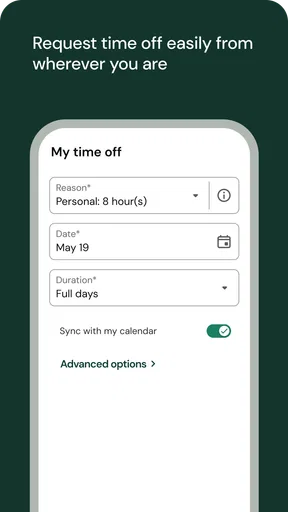
One thing that really caught my attention is how seamlessly everything is integrated. From payroll to scheduling, it’s like having your own personal HR department right in your pocket. The app even lets you check your benefits and access pay statements with just a few taps. It’s like magic for your work life!
Another feature worth mentioning is the time management functionality. You can clock in and out directly from the app, which is a game-changer for anyone who’s always on the move. Plus, the notifications keep you in the loop without being too intrusive, which I really appreciate.
How It Makes Life Easier
Now, let’s talk about how convenient this app is. If you’re like me and sometimes forget important dates, the calendar feature will be your new best friend. It keeps track of everything, from upcoming shifts to important meetings. It’s like having a personal assistant who’s always on top of things.
And, of course, the security is top-notch. We all know how important it is to keep our personal information safe, and it does not disappoint. You can rest easy knowing your data is secure, which is a huge relief in today’s digital age.
Wrapping Up
In conclusion, if you’re looking for a reliable app to streamline your work-related tasks, it is definitely worth checking out. It’s packed with features that not only make life easier but also give you peace of mind when it comes to managing your professional life. Who knew staying organized could be this effortless? Give it a try and see for yourself!
Pros
- User-friendly interface for easy navigation.
- Comprehensive payroll management features.
- Robust reporting and analytics tools.
- Seamless integration with other HR systems.
- Strong data security and privacy measures.
Cons
- Complex setup process for new users.
- Occasional glitches in mobile version.
- Limited customization options available.
- Requires regular updates for optimal use.
- Customer support can be slow at times.
FAQs for UKG Pro
What is UKG Pro and what can I use it for?
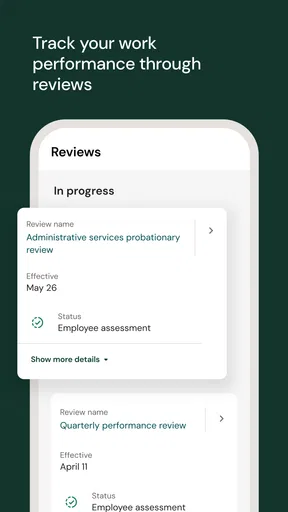
UKG Pro is a comprehensive human capital management (HCM) solution designed to manage various aspects of employee management. It includes features for payroll, talent acquisition, performance management, and more. Ideal for businesses of all sizes, UKG Pro helps streamline HR processes and improve workforce productivity.
Is UKG Pro suitable for small businesses?
Yes, UKG Pro is suitable for small to large businesses. While it offers robust features that cater to the needs of larger enterprises, its customizable options and scalable solutions make it accessible and beneficial for small businesses looking to enhance their HR functions and employee engagement.
What platforms does UKG Pro support?
UKG Pro is available on both Android and iOS platforms, ensuring mobile accessibility for users. This allows employees and managers to access essential HR features and data on the go, enhancing flexibility and convenience in managing workforce-related tasks from anywhere.
How secure is the data within UKG Pro?
UKG Pro places a strong emphasis on data security, employing industry-standard encryption and security protocols to protect sensitive information. The platform adheres to compliance regulations and undergoes regular audits to ensure the highest standards of data protection for its users.
Does UKG Pro offer customer support for users?
Yes, UKG Pro provides comprehensive customer support, including online resources, tutorials, and a dedicated support team. Users can access assistance through various channels, ensuring that any issues or questions are addressed promptly to optimize their experience with the platform.


